
Binary Search Trees, Traversals and Balancing in Python


Data Structures and Algorithms in Python is beginner-friendly introduction to common data structures (linked lists, stacks, queues, graphs) and algorithms (search, sorting, recursion, dynamic programming) in Python, designed to help you prepare for coding interviews and assessments.
This tutorial is an executable Jupyter notebook. Click the Open in Colab button at the top of this page to execute the code.
Jupyter Notebooks: This notebook is made of cells. Each cell can contain code written in Python or explanations in plain English. You can execute code cells and view the results instantly within the notebook. Jupyter is a powerful platform for experimentation and analysis. Don't be afraid to mess around with the code & break things - you'll learn a lot by encountering and fixing errors. You can use the "Kernel > Restart & Clear Output" menu option to clear all outputs and start again from the top.
Problem
In this notebook, we'll focus on solving the following problem:
QUESTION 1: As a senior backend engineer at Jovian, you are tasked with developing a fast in-memory data structure to manage profile information (username, name and email) for 100 million users. It should allow the following operations to be performed efficiently:
- Insert the profile information for a new user.
- Find the profile information of a user, given their username
- Update the profile information of a user, given their usrname
- List all the users of the platform, sorted by username
You can assume that usernames are unique.
Along the way, we will also solve several other questions related to binary trees and binary search trees that are often asked in coding interviews and assessments.
The Method
Here's a systematic strategy we'll apply for solving problems:
- State the problem clearly. Identify the input & output formats.
- Come up with some example inputs & outputs. Try to cover all edge cases.
- Come up with a correct solution for the problem. State it in plain English.
- Implement the solution and test it using example inputs. Fix bugs, if any.
- Analyze the algorithm's complexity and identify inefficiencies, if any.
- Apply the right technique to overcome the inefficiency. Repeat steps 3 to 6.
1. State the problem clearly. Identify the input & output formats.
Problem
We need to create a data structure which can store 100 million records and perform insertion, search, update and list operations efficiently.
Input
The key inputs to our data structure are user profiles, which contain the username, name and email of a user.
A Python class would be a great way to represent the information for a user. A class is a blueprint for creating objects. Everything in Python is an object belonging to some class. Here's the simples possible class in Python, with nothing in it:
class User:
    pass
We can create or instantiate an object of the class by calling it like a function.
user1 = User()We can verify that the object is of the class User.
user1<__main__.User at 0x7faf012c3b00>type(user1)__main__.UserThe object user1 does not contain any useful information. Let's add a constructor method to the class to store some attributes or properties.
class User:
    def __init__(self, username, name, email):
        self.username = username
        self.name = name
        self.email = email
        print('User created!')
We can now create an object with some properties.
user2 = User('john', 'John Doe', 'john@doe.com')User created!
user2<__main__.User at 0x7faf012c3e48>Here's what's happening above (conceptually):
- Python creates an empty object of the type user and stores in the variable
user2 - Python then invokes the function
User.___init__with the argumentsuser2,"john","John Doe"and"john@doe.com" - As the
__init__function is executed, the propertiesusername,nameandemailare set on the objectuser2
We can access the properties of the object using the . notation.
user2.name'John Doe'user2.email, user2.username('john@doe.com', 'john')You can also define custom methods inside a class.
class User:
    def __init__(self, username, name, email):
        self.username = username
        self.name = name
        self.email = email

    def introduce_yourself(self, guest_name):
        print("Hi {}, I'm {}! Contact me at {} .".format(guest_name, self.name, self.email))
user3 = User('jane', 'Jane Doe', 'jane@doe.com')user3.introduce_yourself('David')Hi David, I'm Jane Doe! Contact me at jane@doe.com .
When we try to invoke the method user3.introduce_yourself, the object user3 is automatically passed as the first argument self. Indeed, the following statement is equivalent to the above statement.
User.introduce_yourself(user3, 'David')Hi David, I'm Jane Doe! Contact me at jane@doe.com .
Finally, we'll define a couple of helper methods to display user objects nicely within Jupyter.
class User:
    def __init__(self, username, name, email):
        self.username = username
        self.name = name
        self.email = email

    def __repr__(self):
        return "User(username='{}', name='{}', email='{}')".format(self.username, self.name, self.email)

    def __str__(self):
        return self.__repr__()
user4 = User('jane', 'Jane Doe', 'jane@doe.com')user4User(username='jane', name='Jane Doe', email='jane@doe.com')Exercise: What is the purpose of defining the functions __str__ and __repr__ within a class? How are the two functions different? Illustrate with some examples using the empty cells below.
Output
We can also express our desired data structure as a Python class UserDatabase with four methods: insert, find, update and list_all.
class UserDatabase:
    def insert(self, user):
        pass

    def find(self, username):
        pass

    def update(self, user):
        pass

    def list_all(self):
        pass
It's good programming practice to list out the signatures of different class functions before we actually implement the class.
2. Come up with some example inputs & outputs.
Let's create some sample user profiles that we can use to test our functions once we implement them.
aakash = User('aakash', 'Aakash Rai', 'aakash@example.com')
biraj = User('biraj', 'Biraj Das', 'biraj@example.com')
hemanth = User('hemanth', 'Hemanth Jain', 'hemanth@example.com')
jadhesh = User('jadhesh', 'Jadhesh Verma', 'jadhesh@example.com')
siddhant = User('siddhant', 'Siddhant Sinha', 'siddhant@example.com')
sonaksh = User('sonaksh', 'Sonaksh Kumar', 'sonaksh@example.com')
vishal = User('vishal', 'Vishal Goel', 'vishal@example.com')
users = [aakash, biraj, hemanth, jadhesh, siddhant, sonaksh, vishal]We can access different fields within a user profile object using the . (dot) notation.
biraj.username, biraj.email, biraj.name('biraj', 'biraj@example.com', 'Biraj Das')We can also view a string representation of the object, since defined the __repr__ and __str__ methods
print(aakash)User(username='aakash', name='Aakash Rai', email='aakash@example.com')
users[User(username='aakash', name='Aakash Rai', email='aakash@example.com'),
User(username='biraj', name='Biraj Das', email='biraj@example.com'),
User(username='hemanth', name='Hemanth Jain', email='hemanth@example.com'),
User(username='jadhesh', name='Jadhesh Verma', email='jadhesh@example.com'),
User(username='siddhant', name='Siddhant Sinha', email='siddhant@example.com'),
User(username='sonaksh', name='Sonaksh Kumar', email='sonaksh@example.com'),
User(username='vishal', name='Vishal Goel', email='vishal@example.com')]Since we haven't implemented our data structure yet, it's not possible to list sample outputs. However you can try to come up with different scenarios to test future implementations
Exercise: List some scenarios for testing the class methods insert, find, update and list_all.
-
Insert:
- Inserting into an empty database of users
- Trying to insert a user with a username that already exists
- Inserting a user with a username that does not exist
- ???
-
Find:
- ???
- ???
- ???
-
Update:
- ???
- ???
- ???
-
List:
- ???
- ???
- ???
3. Come up with a correct solution. State it in plain English.
Here's a simple and easy solution to the problem: we store the User objects in a list sorted by usernames.
The various functions can be implemented as follows:
- Insert: Loop through the list and add the new user at a position that keeps the list sorted.
- Find: Loop through the list and find the user object with the username matching the query.
- Update: Loop through the list, find the user object matching the query and update the details
- List: Return the list of user objects.
We can use the fact usernames, which are are strings can be compared using the <, > and == operators in Python.
'biraj' < 'hemanth'True4. Implement the solution and test it using example inputs.
The code for implementing the above solution is also fairly straightfoward.
class UserDatabase:
    def __init__(self):
        self.users = []

    def insert(self, user):
        i = 0
        while i < len(self.users):
            # Find the first username greater than the new user's username
            if self.users[i].username > user.username:
                break
            i += 1
        self.users.insert(i, user)

    def find(self, username):
        for user in self.users:
            if user.username == username:
                return user

    def update(self, user):
        target = self.find(user.username)
        target.name, target.email = user.name, user.email

    def list_all(self):
        return self.users
We can create a new database of users by instantiating and object of the UserDatabase class.
database = UserDatabase()Let's insert some entires into the object.
database.insert(hemanth)
database.insert(aakash)
database.insert(siddhant)
We can now retrieve the data for a user, given their username.
user = database.find('siddhant')
user
User(username='siddhant', name='Siddhant Sinha', email='siddhant@example.com')Let's try changing the information for a user
database.update(User(username='siddhant', name='Siddhant U', email='siddhantu@example.com'))user = database.find('siddhant')
userUser(username='siddhant', name='Siddhant U', email='siddhantu@example.com')Finally, we can retrieve a list of users in alphabetical order.
database.list_all()[User(username='aakash', name='Aakash Rai', email='aakash@example.com'),
User(username='hemanth', name='Hemanth Jain', email='hemanth@example.com'),
User(username='siddhant', name='Siddhant U', email='siddhantu@example.com')]Let's verify that a new user is inserted into the correct position.
database.insert(biraj)database.list_all()[User(username='aakash', name='Aakash Rai', email='aakash@example.com'),
User(username='biraj', name='Biraj Das', email='biraj@example.com'),
User(username='hemanth', name='Hemanth Jain', email='hemanth@example.com'),
User(username='siddhant', name='Siddhant U', email='siddhantu@example.com')]The user biraj was inserted just before hemanth, as expected.
Exercise: Use the empty cells below to test the various scenarios you listed in step 2 above.
5. Analyze the algorithm's complexity and identify inefficiencies
The operations insert, find, update involves iterating over a list of users, in the worst case, they may take up to N iterations to return a result, where N is the total number of users. list_all however, simply returns the existing internal list of users.
Thus, the time complexities of the various operations are:
- Insert: O(N)
- Find: O(N)
- Update: O(N)
- List: O(1)
Exercise: Verify that the space complexity of each operation is O(1).
Is this good enough? To get a sense how long each function might take if there are 100 million users on the platform, we can simply run an for or while loop on 10 million numbers.
%%time
for i in range(100000000):
    j = i*i
CPU times: user 8.42 s, sys: 8.05 ms, total: 8.42 s
Wall time: 8.43 s
It takes almost 10 seconds to execute all the iterations in the above cell.
- A 10-second delay for fetching user profiles will lead to a suboptimal users experience and may cause many users to stop using the platform altogether.
- The 10-second processing time for each profile request will also significantly limit the number of users that can access the platform at a time or increase the cloud infrastructure costs for the company by millions of dollars.
As a senior backend engineer, you must come up with a more efficient data structure! Choosing the right data structure for the requirements at hand is an important skill. It's apparent that a sorted list of users might not be the best data structure to organize profile information for millions of users.
6. Apply the right technique to overcome the inefficiency
We can limit the number of iterations required for common operations like find, insert and update by organizing our data in the following structure, called a binary tree:
It's called a tree because it vaguely like an inverted tree trunk with branches.
- The word "binary" indicates that each "node" in the tree can have at most 2 children (left or right).
- Nodes can have 0, 1 or 2 children. Nodes that do not have any children are sometimes also called "leaves".
- The single node at the top is called the "root" node, and it typically where operations like search, insertion etc. begin.

Balanced Binary Search Trees

For our use case, we require the binary tree to have some additional properties:
- Keys and Values: Each node of the tree stores a key (a username) and a value (a
Userobject). Only keys are shown in the picture above for brevity. A binary tree where nodes have both a key and a value is often referred to as a map or treemap (because it maps keys to values). - Binary Search Tree: The left subtree of any node only contains nodes with keys that are lexicographically smaller than the node's key, and the right subtree of any node only contains nodes with keys that lexicographically larger than the node's key. A tree that satisfies this property is called a binary search trees, and it's easy to locate a specific key by traversing a single path down from the root note.
- Balanced Tree: The tree is balanced i.e. it does not skew too heavily to one side or the other. The left and right subtrees of any node shouldn't differ in height/depth by more than 1 level.
Height of a Binary Tree
The number of levels in a tree is called its height. As you can tell from the picture above, each level of a tree contains twice as many nodes as the previous level.
For a tree of height k, here's a list of the number of nodes at each level:
Level 0: 1
Level 1: 2
Level 2: 4 i.e. 2^2
Level 3: 8 i.e. 2^3
...
Level k-1: 2^(k-1)
If the total number of nodes in the tree is N, then it follows that
N = 1 + 2^1 + 2^2 + 2^3 + ... + 2^(k-1)
We can simplify this equation by adding 1 on each side:
N + 1 = 1 + 1 + 2^1 + 2^2 + 2^3 + ... + 2^(k-1)

N + 1 = 2^1 + 2^1 + 2^2+ 2^3 + ... + 2^(k-1)

N + 1 = = 2^2 + 2^2 + 2^3 + ... + 2^(k-1)

N + 1 = = 2^3 + 2^3 + ... + 2^(k-1)

...

N + 1 = 2^(k-1) + 2^(k-1)

N + 1 = 2^k

k = log(N + 1) <= log(N) + 1
Thus, to store N records we require a balanced binary search tree (BST) of height no larger than log(N) + 1. This is a very useful property, in combination with the fact that nodes are arranged in a way that makes it easy to find a specific key by following a single path down from the root.
As we'll see soon, the insert, find and update operations in a balanced BST have time complexity O(log N) since they all involve traversing a single path down from the root of the tree.
Binary Tree
QUESTION 2: Implement a binary tree using Python, and show its usage with some examples.
To begin, we'll create simple binary tree (without any of the additional properties) containing numbers as keys within nodes. Here's an example:

Here's a simple class representing a node within a binary tree.
class TreeNode:
    def __init__(self, key):
        self.key = key
        self.left = None
        self.right = None
Let's create objects representing each node of the above tree
node0 = TreeNode(3)
node1 = TreeNode(4)
node2 = TreeNode(5)
Let's verify that node0 is an object of the type TreeNode and has the property key set to 3.
node0<__main__.TreeNode at 0x7faf03417b00>node0.key3We can connect the nodes by setting the .left and .right properties of the root node.
node0.left = node1
node0.right = node2
And we're done! We can create a new variable tree which simply points to the root node, and use it to access all the nodes within the tree.
tree = node0tree.key3tree.left.key4tree.right.key5Going forward, we'll use the term "tree" to refer to the root node. The term "node" can refer to any node in a tree, not necessarily the root.
Exercise: Create the following binary tree using the TreeNode class defined above.

It's a bit inconvenient to create a tree by manually connecting all the nodes. Let's write a helper function which can convert a tuple with the structure ( left_subtree, key, right_subtree) (where left_subtree and right_subtree are themselves tuples) into binary tree.
Here's an tuple representing the tree shown above:
tree_tuple = ((1,3,None), 2, ((None, 3, 4), 5, (6, 7, 8)))def parse_tuple(data):
# print(data)
if isinstance(data, tuple) and len(data) == 3:
node = TreeNode(data[1])
node.left = parse_tuple(data[0])
node.right = parse_tuple(data[2])
elif data is None:
node = None
else:
node = TreeNode(data)
return nodeThe parse_tuple creates a new root node when a tuple of size 3 as an the input. Interestingly, to create the left and right subtrees for the node, the parse_tuple function invokes itself. This technique is called recursion. The chain of recursive calls ends when parse_tuple encounters a number or None as input. We'll use recursion extensively throughout this tutorial.
Exercise: Add print statements inside parse_tuple to display the arguments for each call of the function. Does the sequence of recursive calls make sense to you?
Let's try out parse_tuple with the tuple define earlier.
tree2 = parse_tuple(((1,3,None), 2, ((None, 3, 4), 5, (6, 7, 8))))tree2<__main__.TreeNode at 0x7faf034263c8>We can now examine the tree to verify that it was constructed as expected.
tree2.key2tree2.left.key, tree2.right.key(3, 5)tree2.left.left.key, tree2.left.right, tree2.right.left.key, tree2.right.right.key(1, None, 3, 7)tree2.right.left.right.key, tree2.right.right.left.key, tree2.right.right.right.key(4, 6, 8)Exercise: Define a function tree_to_tuple that converts a binary tree into a tuple representing the same tree. E.g. tree_to_tuple converts the tree created above to the tuple ((1, 3, None), 2, ((None, 3, 4), 5, (6, 7, 8))). Hint: Use recursion.
def tree_to_tuple(node):
    pass
Let's create another helper function to display all the keys in a tree-like structure for easier visualization.
def display_keys(node, space='\t', level=0):
    # print(node.key if node else None, level)

    # If the node is empty
    if node is None:
        print(space*level + '∅')
        return

    # If the node is a leaf
    if node.left is None and node.right is None:
        print(space*level + str(node.key))
        return

    # If the node has children
    display_keys(node.right, space, level+1)
    print(space*level + str(node.key))
    display_keys(node.left,space, level+1)
Once again, the display_keys function users recursion to print all the keys of the left and right subtree with proper indentation.
Exercise: Add print statements inside display_keys to display the arguments for each call of the function. Does the sequence of recursive calls make sense to you?
Let's try using the function.
display_keys(tree2, ' ') 8
7
6
5
4
3
∅
2
∅
3
1
We can now visualize the tree that was just created (albeit rotated by 90 degrees). It's easy to see that it matches the expected structure.
Exercise: Create some more trees and visualize them using display_keys. You can use excalidraw.com as a digital whiteboard to create trees.
Traversing a Binary Tree
The following questions are frequently asked in coding interviews and assessments:
QUESTION 3: Write a function to perform the inorder traversal of a binary tree.
QUESTION 4: Write a function to perform the preorder traversal of a binary tree.
QUESTION 5: Write a function to perform the postorder traversal of a binary tree.
A traversal refers to the process of visiting each node of a tree exactly once. Visiting a node generally refers to adding the node's key to a list. There are three ways to traverse a binary tree and return the list of visited keys:
Inorder traversal
- Traverse the left subtree recursively inorder.
- Traverse the current node.
- Traverse the right subtree recursively inorder.

Preorder traversal
- Traverse the current node.
- Traverse the left subtree recursively preorder.
- Traverse the right subtree recursively preorder.

Can you guess how postorder traversal works??
Here's an implementation of inorder traversal of a binary tree.
def traverse_in_order(node):
    if node is None:
        return []
    return(traverse_in_order(node.left) +
           [node.key] +
           traverse_in_order(node.right))
Let's try it out with this tree:
tree = parse_tuple(((1,3,None), 2, ((None, 3, 4), 5, (6, 7, 8))))display_keys(tree, ' ') 8
7
6
5
4
3
∅
2
∅
3
1
traverse_in_order(tree)[1, 3, 2, 3, 4, 5, 6, 7, 8]Exercise: Implement functions for preorder and postorder traversal of a binary tree.
Test your implementations by making submissions to the following problems:
Height and Size of a Binary Tree
QUESTION 6: Write a function to calculate the height/depth of a binary tree
QUESTION 7: Write a function to count the number of nodes in a binary tree
The height/depth of a binary tree is defined as the length of the longest path from its root node to a leaf. It can be computed recursively, as follows:
def tree_height(node):
    if node is None:
        return 0
    return 1 + max(tree_height(node.left), tree_height(node.right))
Let's compute the height of this tree:
tree_height(tree)4Here's a function to count the number of nodes in a binary tree.
def tree_size(node):
    if node is None:
        return 0
    return 1 + tree_size(node.left) + tree_size(node.right)
tree_size(tree)9Exercise: Try solving these problems relating to path lengths in a binary tree:
As a final step, let's compile all the functions we've written so far as methods withing the TreeNode class itself. Encapsulation of data and functionality within the same class is a good programming practice.
class TreeNode():
    def __init__(self, key):
        self.key, self.left, self.right = key, None, None

    def height(self):
        if self is None:
            return 0
        return 1 + max(TreeNode.height(self.left), TreeNode.height(self.right))

    def size(self):
        if self is None:
            return 0
        return 1 + TreeNode.size(self.left) + TreeNode.size(self.right)

    def traverse_in_order(self):
        if self is None:
            return []
        return (TreeNode.traverse_in_order(self.left) +
                [self.key] +
                TreeNode.traverse_in_order(self.right))

    def display_keys(self, space='\t', level=0):
        # If the node is empty
        if self is None:
            print(space*level + '∅')
            return

        # If the node is a leaf
        if self.left is None and self.right is None:
            print(space*level + str(self.key))
            return

        # If the node has children
        display_keys(self.right, space, level+1)
        print(space*level + str(self.key))
        display_keys(self.left,space, level+1)

    def to_tuple(self):
        if self is None:
            return None
        if self.left is None and self.right is None:
            return self.key
        return TreeNode.to_tuple(self.left),  self.key, TreeNode.to_tuple(self.right)

    def __str__(self):
        return "BinaryTree <{}>".format(self.to_tuple())

    def __repr__(self):
        return "BinaryTree <{}>".format(self.to_tuple())

    @staticmethod
    def parse_tuple(data):
        if data is None:
            node = None
        elif isinstance(data, tuple) and len(data) == 3:
            node = TreeNode(data[1])
            node.left = TreeNode.parse_tuple(data[0])
            node.right = TreeNode.parse_tuple(data[2])
        else:
            node = TreeNode(data)
        return node
The class method invocations TreeNode.height(node) and node.height() are equivalent. Can you guess why we're using the former in the function definitions above?
Let's try out the various methods defined above for this tree:
tree_tuple((1, 3, None), 2, ((None, 3, 4), 5, (6, 7, 8)))tree = TreeNode.parse_tuple(tree_tuple)treeBinaryTree <((1, 3, None), 2, ((None, 3, 4), 5, (6, 7, 8)))>tree.display_keys(' ') 8
7
6
5
4
3
∅
2
∅
3
1
tree.height()4tree.size()9tree.traverse_in_order()[1, 3, 2, 3, 4, 5, 6, 7, 8]tree.to_tuple()((1, 3, None), 2, ((None, 3, 4), 5, (6, 7, 8)))Exercise: Create some more trees and try out the operations defined above. Add more operations to the TreeNode class.
Binary Search Tree (BST)
A binary search tree or BST is a binary tree that satisfies the following conditions:
- The left subtree of any node only contains nodes with keys less than the node's key
- The right subtree of any node only contains nodes with keys greater than the node's key
It follows from the above conditions that every subtree of a binary search tree must also be a binary search tree.
QUESTION 8: Write a function to check if a binary tree is a binary search tree (BST).
QUESTION 9: Write a function to find the maximum key in a binary tree.
QUESTION 10: Write a function to find the minimum key in a binary tree.
Here's a function that covers all of the above:
def remove_none(nums):
    return [x for x in nums if x is not None]

def is_bst(node):
    if node is None:
        return True, None, None

    is_bst_l, min_l, max_l = is_bst(node.left)
    is_bst_r, min_r, max_r = is_bst(node.right)

    is_bst_node = (is_bst_l and is_bst_r and
              (max_l is None or node.key > max_l) and
              (min_r is None or node.key < min_r))

    min_key = min(remove_none([min_l, node.key, min_r]))
    max_key = max(remove_none([max_l, node.key, max_r]))

    # print(node.key, min_key, max_key, is_bst_node)

    return is_bst_node, min_key, max_key
The following tree is not a BST (because a node with the key 3 appears in the left subtree of a node with the key 2):
Let's verify this using is_bst.
tree1 = TreeNode.parse_tuple(((1, 3, None), 2, ((None, 3, 4), 5, (6, 7, 8))))is_bst(tree1)(False, 1, 8)On the other hand, the following tree is a BST:

Let's create this tree and verify that it is a BST. Note that the TreeNode class also supports using strings as keys, as strings support the comparison operators < and > too.
tree2 = TreeNode.parse_tuple((('aakash', 'biraj', 'hemanth') , 'jadhesh', ('siddhant', 'sonaksh', 'vishal')))is_bst(tree2)(True, 'aakash', 'vishal')Exercise: Test the is_bst function with some more examples using the empty cells below.
Storing Key-Value Pairs using BSTs
Recall that we need to store user objects with each key in our BST. Let's define new class BSTNode to represent the nodes of of our tree. Apart from having properties key, left and right, we'll also store a value and pointer to the parent node (for easier upward traversal).
class BSTNode():
    def __init__(self, key, value=None):
        self.key = key
        self.value = value
        self.left = None
        self.right = None
        self.parent = None
Let's try to recreate this BST with usernames as keys and user objects as values:
# Level 0
tree = BSTNode(jadhesh.username, jadhesh)
# View Level 0
tree.key, tree.value('jadhesh',
User(username='jadhesh', name='Jadhesh Verma', email='jadhesh@example.com'))# Level 1
tree.left = BSTNode(biraj.username, biraj)
tree.right = BSTNode(sonaksh.username, sonaksh)# View Level 1
tree.left.key, tree.left.value, tree.right.key, tree.right.value('biraj',
User(username='biraj', name='Biraj Das', email='biraj@example.com'),
'sonaksh',
User(username='sonaksh', name='Sonaksh Kumar', email='sonaksh@example.com'))Exercise: Add the next layer of nodes to the tree and verify that they were added properly.
We can use the same display_keys function we defined earlier to visualize our tree.
display_keys(tree) sonaksh
jadhesh
biraj
Insertion into BST
QUESTION 11: Write a function to insert a new node into a BST.
We use the BST-property to perform insertion efficiently:
- Starting from the root node, we compare the key to be inserted with the current node's key
- If the key is smaller, we recursively insert it in the left subtree (if it exists) or attach it as as the left child if no left subtree exists.
- If the key is larger, we recursively insert it in the right subtree (if it exists) or attach it as as the right child if no right subtree exists.
Here's a recursive implementation of insert.
def insert(node, key, value):
if node is None:
node = BSTNode(key, value)
elif key < node.key:
node.left = insert(node.left, key, value)
node.left.parent = node
elif key > node.key:
node.right = insert(node.right, key, value)
node.right.parent = node
return nodeLet's use this to recreate our tree.
To create the first node, we can use the insert function with None as the target tree.
tree = insert(None, jadhesh.username, jadhesh)The remaining nodes can now be inserted into tree.
insert(tree, biraj.username, biraj)
insert(tree, sonaksh.username, sonaksh)
insert(tree, aakash.username, aakash)
insert(tree, hemanth.username, hemanth)
insert(tree, siddhant.username, siddhant)
insert(tree, vishal.username, siddhant)<__main__.BSTNode at 0x7faf03428ba8>display_keys(tree) vishal
sonaksh
siddhant
jadhesh
hemanth
biraj
aakash
Perfect! The tree was created as expected.
Note, however, that the order of insertion of nodes change the structure of the resulting tree.
tree2 = insert(None, aakash.username, aakash)
insert(tree2, biraj.username, biraj)
insert(tree2, hemanth.username, hemanth)
insert(tree2, jadhesh.username, jadhesh)
insert(tree2, siddhant.username, siddhant)
insert(tree2, sonaksh.username, sonaksh)
insert(tree2, vishal.username, vishal)<__main__.BSTNode at 0x7faf03417080>display_keys(tree2) vishal
sonaksh
∅
siddhant
∅
jadhesh
∅
hemanth
∅
biraj
∅
aakash
∅
Can you see why the tree created above is skewed/unbalanced?

Skewed/unbalanced BSTs are problematic because the height of such trees often ceases to logarithmic compared to the number of nodes in the tree. For instance the above tree has 7 nodes and height 7.
The length of the path traversed by insert is equal to the height of the tree (in the worst case). It follows that if the tree is balanced, the time complexity of insertion is O(log N) otherwise it is O(N).
tree_height(tree2)7Exercise: Create some more balanced and unbalanced BSTs using the insert function defined above.
Finding a Node in BST
QUESTION 11: Find the value associated with a given key in a BST.
We can follow a recursive strategy similar to insertion to find the node with a given key within a BST.
def find(node, key):
if node is None:
return None
if key == node.key:
return node
if key < node.key:
return find(node.left, key)
if key > node.key:
return find(node.right, key)
node = find(tree, 'hemanth')node.key, node.value('hemanth',
User(username='hemanth', name='Hemanth Jain', email='hemanth@example.com'))The the length of the path followed by find is equal to the height of the tree (in the worst case). Thus it has a similar time complexity as insert.
Example: Try finding some more nodes from the BST created above (or create new trees).
Updating a value in a BST
QUESTION 12: Write a function to update the value associated with a given key within a BST
We can use find to locate the node to be updated, and simply update it's value.
def update(node, key, value):
target = find(node, key)
if target is not None:
target.value = valueupdate(tree, 'hemanth', User('hemanth', 'Hemanth J', 'hemanthj@example.com'))node = find(tree, 'hemanth')
node.valueUser(username='hemanth', name='Hemanth J', email='hemanthj@example.com')The value of the node was successfully updated. The time complexity of update is the same as that of find.
Exercise: Try some more update operations using the BST created earlier.
List the nodes
QUESTION 13: Write a function to retrieve all the key-values pairs stored in a BST in the sorted order of keys.
The nodes can be listed in sorted order by performing an inorder traversal of the BST.
def list_all(node):
if node is None:
return []
return list_all(node.left) + [(node.key, node.value)] + list_all(node.right)list_all(tree)[('aakash',
User(username='aakash', name='Aakash Rai', email='aakash@example.com')),
('biraj',
User(username='biraj', name='Biraj Das', email='biraj@example.com')),
('hemanth',
User(username='hemanth', name='Hemanth J', email='hemanthj@example.com')),
('jadhesh',
User(username='jadhesh', name='Jadhesh Verma', email='jadhesh@example.com')),
('siddhant',
User(username='siddhant', name='Siddhant U', email='siddhantu@example.com')),
('sonaksh',
User(username='sonaksh', name='Sonaksh Kumar', email='sonaksh@example.com')),
('vishal',
User(username='siddhant', name='Siddhant U', email='siddhantu@example.com'))]Exercise: Determine the time complexity and space complexity of list_all.
Balanced Binary Trees
QUESTION 14: Write a function to determine if a binary tree is balanced.
Here's a recursive strategy:
- Ensure that the left subtree is balanced.
- Ensure that the right subtree is balanced.
- Ensure that the difference between heights of left subtree and right subtree is not more than 1.
def is_balanced(node):
if node is None:
return True, 0
balanced_l, height_l = is_balanced(node.left)
balanced_r, height_r = is_balanced(node.right)
balanced = balanced_l and balanced_r and abs(height_l - height_r) <=1
height = 1 + max(height_l, height_r)
return balanced, heightThe following tree is balanced:
is_balanced(tree)(True, 3)The following tree is not balanced:
is_balanced(tree2)(False, 7)Exercise: Is the tree shown below balanced? Why or why not? Create this tree and check if it's balanced using the is_balanced function.

Also try this related problem on complete binary trees: https://leetcode.com/problems/check-completeness-of-a-binary-tree/
Balanced Binary Search Trees
QUESTION 15: Write a function to create a balanced BST from a sorted list/array of key-value pairs.
We can use a recursive strategy here, turning the middle element of the list into the root, and recursively creating left and right subtrees.
def make_balanced_bst(data, lo=0, hi=None, parent=None):
if hi is None:
hi = len(data) - 1
if lo > hi:
return None
mid = (lo + hi) // 2
key, value = data[mid]
root = BSTNode(key, value)
root.parent = parent
root.left = make_balanced_bst(data, lo, mid-1, root)
root.right = make_balanced_bst(data, mid+1, hi, root)
return root
data = [(user.username, user) for user in users]
data[('aakash',
User(username='aakash', name='Aakash Rai', email='aakash@example.com')),
('biraj',
User(username='biraj', name='Biraj Das', email='biraj@example.com')),
('hemanth',
User(username='hemanth', name='Hemanth Jain', email='hemanth@example.com')),
('jadhesh',
User(username='jadhesh', name='Jadhesh Verma', email='jadhesh@example.com')),
('siddhant',
User(username='siddhant', name='Siddhant U', email='siddhantu@example.com')),
('sonaksh',
User(username='sonaksh', name='Sonaksh Kumar', email='sonaksh@example.com')),
('vishal',
User(username='vishal', name='Vishal Goel', email='vishal@example.com'))]tree = make_balanced_bst(data)display_keys(tree) vishal
sonaksh
siddhant
jadhesh
hemanth
biraj
aakash
Recall that the same list of users, when inserted one-by-one resulted in a skewed tree.
tree3 = None
for username, user in data:
    tree3 = insert(tree3, username, user)
Balancing an Unbalanced BST
QUESTION 16: Write a function to balance an unbalanced binary search tree.
We first perform an inorder traversal, then create a balanced BST using the function defined earlier.
def balance_bst(node):
    return make_balanced_bst(list_all(node))
tree1 = None
for user in users:
tree1 = insert(tree1, user.username, user)display_keys(tree1) vishal
sonaksh
∅
siddhant
∅
jadhesh
∅
hemanth
∅
biraj
∅
aakash
∅
tree2 = balance_bst(tree1)display_keys(tree2) vishal
sonaksh
siddhant
jadhesh
hemanth
biraj
aakash
After every insertion, we can balance the tree. This way the tree will remain balanced.
Complexity of the various operations in a balanced BST:
- Insert - O(log N) + O(N) = O(N)
- Find - O(log N)
- Update - O(log N)
- List all - O(N)
What's the real improvement between O(N) and O(log N)?
import math

math.log(100000000, 2)26.5754247590989The logarithm (base 2) of 100 million is around 26. Thus, it takes only 26 operations to find or update a node within a BST (as opposed to 100 million).
%%time
for i in range(26):
    j = i*i
CPU times: user 8 µs, sys: 1e+03 ns, total: 9 µs
Wall time: 14.1 µs
Compared to linear time:
%%time
for i in range(100000000):
    j = i*i
CPU times: user 8.85 s, sys: 10.2 ms, total: 8.86 s
Wall time: 8.87 s
Thus, find and update from a balanced binary search tree is 300,000 times faster than our original solution. To speed up insertions, we may choose to perform the balancing periodically (e.g. once every 1000 insertions). This way, most insertions will be O (log N), but every 1000th insertion will take a few seconds. Another options is to rebalance the tree periodically at the end of every hour.
A Python-Friendly Treemap
We are now ready to return to our original problem statement.
QUESTION 1: As a senior backend engineer at Jovian, you are tasked with developing a fast in-memory data structure to manage profile information (username, name and email) for 100 million users. It should allow the following operations to be performed efficiently:
- Insert the profile information for a new user.
- Find the profile information of a user, given their username
- Update the profile information of a user, given their usrname
- List all the users of the platform, sorted by username
You can assume that usernames are unique.
We can create a generic class TreeMap which supports all the operations specified in the original problem statement in a python-friendly manner.
class TreeMap():
    def __init__(self):
        self.root = None

    def __setitem__(self, key, value):
        node = find(self.root, key)
        if not node:
            self.root = insert(self.root, key, value)
            self.root = balance_bst(self.root)
        else:
            update(self.root, key, value)


    def __getitem__(self, key):
        node = find(self.root, key)
        return node.value if node else None

    def __iter__(self):
        return (x for x in list_all(self.root))

    def __len__(self):
        return tree_size(self.root)

    def display(self):
return display_keys(self.root)Exercise: What is the time complexity of __len__? Can you reduce it to O(1). Hint: Modify the BSTNode class.
Let's try using the TreeMap class below.
users[User(username='aakash', name='Aakash Rai', email='aakash@example.com'),
User(username='biraj', name='Biraj Das', email='biraj@example.com'),
User(username='hemanth', name='Hemanth Jain', email='hemanth@example.com'),
User(username='jadhesh', name='Jadhesh Verma', email='jadhesh@example.com'),
User(username='siddhant', name='Siddhant U', email='siddhantu@example.com'),
User(username='sonaksh', name='Sonaksh Kumar', email='sonaksh@example.com'),
User(username='vishal', name='Vishal Goel', email='vishal@example.com')]treemap = TreeMap()treemap.display()∅
treemap['aakash'] = aakash
treemap['jadhesh'] = jadhesh
treemap['sonaksh'] = sonaksh
treemap.display() sonaksh
jadhesh
aakash
treemap['jadhesh']User(username='jadhesh', name='Jadhesh Verma', email='jadhesh@example.com')len(treemap)3treemap['biraj'] = biraj
treemap['hemanth'] = hemanth
treemap['siddhant'] = siddhant
treemap['vishal'] = vishaltreemap.display() vishal
sonaksh
siddhant
jadhesh
hemanth
biraj
aakash
for key, value in treemap:
    print(key, value)
aakash User(username='aakash', name='Aakash Rai', email='aakash@example.com')
biraj User(username='biraj', name='Biraj Das', email='biraj@example.com')
hemanth User(username='hemanth', name='Hemanth Jain', email='hemanth@example.com')
jadhesh User(username='jadhesh', name='Jadhesh Verma', email='jadhesh@example.com')
siddhant User(username='siddhant', name='Siddhant U', email='siddhantu@example.com')
sonaksh User(username='sonaksh', name='Sonaksh Kumar', email='sonaksh@example.com')
vishal User(username='vishal', name='Vishal Goel', email='vishal@example.com')
list(treemap)[('aakash',
User(username='aakash', name='Aakash Rai', email='aakash@example.com')),
('biraj',
User(username='biraj', name='Biraj Das', email='biraj@example.com')),
('hemanth',
User(username='hemanth', name='Hemanth Jain', email='hemanth@example.com')),
('jadhesh',
User(username='jadhesh', name='Jadhesh Verma', email='jadhesh@example.com')),
('siddhant',
User(username='siddhant', name='Siddhant U', email='siddhantu@example.com')),
('sonaksh',
User(username='sonaksh', name='Sonaksh Kumar', email='sonaksh@example.com')),
('vishal',
User(username='vishal', name='Vishal Goel', email='vishal@example.com'))]treemap['aakash'] = User(username='aakash', name='Aakash N S', email='aakashns@example.com')treemap['aakash']User(username='aakash', name='Aakash N S', email='aakashns@example.com')Exercise: Try out some more examples below. Can our treemap actually handle millions of users profiles?
Self-Balancing Binary Trees and AVL Trees
A self-balancing binary tree remains balanced after every insertion or deletion. Several decades of research has gone into creating self-balancing binary trees, and many approaches have been devised e.g. B-trees, Red Black Trees and AVL (Adelson-Velsky Landis) trees.
We'll take a brief look at AVL trees. Self-balancing in AVL trees is achieved by tracking the balance factor (difference between the height of the left subtree and the right subtree) for each node and rotating unbalanced subtrees along the path of insertion/deletion to balance them.

In a balanced BST, the balance factor of each node is either 0, -1, or 1. When we perform an insertion, then the balance factor of certain nodes along the path of insertion may change to 2 or -2. Those nodes can be "rotated" one-by-one to bring the balance factor back to 1, 0 or -1.
There are 4 different scenarios for balancing, two of which require a single rotation, while the others require 2 rotations:
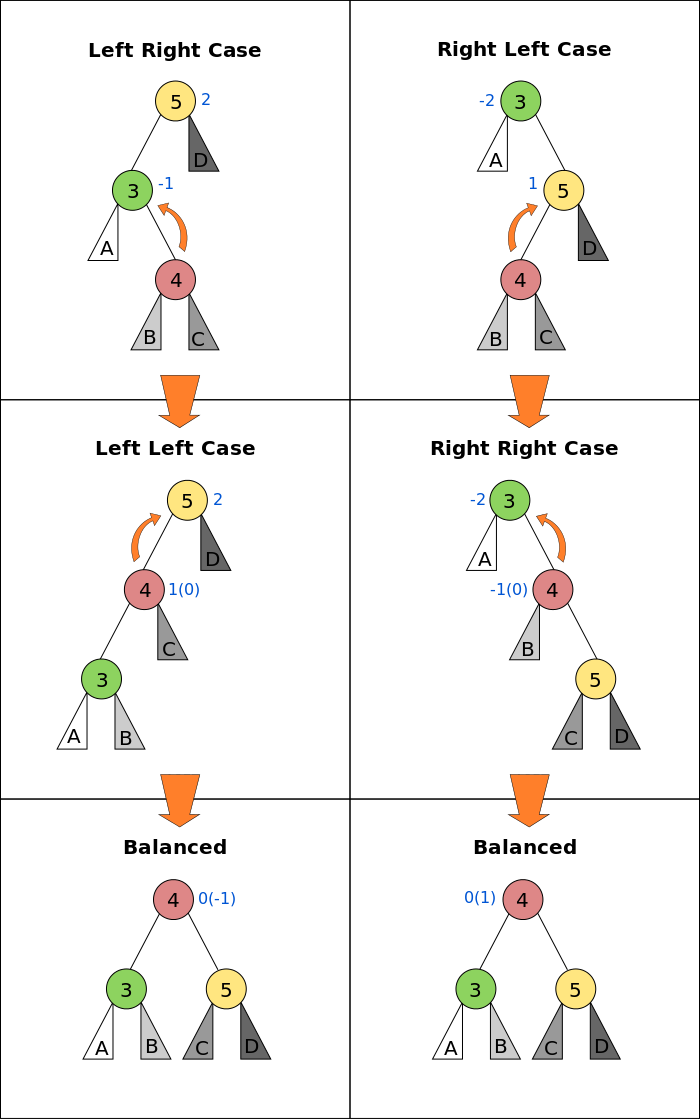
Source: HackerRank
Since each rotation takes constant time, and at most log N rotations may be required, this operation is far more efficient than creating a balanced binary tree from scratch, allowing insertion and deletion to be performed in O (log N) time. Here are some references for AVL Trees:
- Explanation of the various cases: https://youtu.be/jDM6_TnYIqE?t=482
- Implementation: https://www.geeksforgeeks.org/avl-tree-set-1-insertion/
Summary and Exercises
Binary trees form the basis of many modern programming language features (e.g. maps in C++ and Java) and data storage systems (filesystem indexes, relational databases like MySQL). You might wonder if dictionaries in Python are also binary search trees. They're not. They're hash tables, which is a different but equally interesting and important data structure. We'll explore hash tables in a future tutorial.
We've covered a lot of ground this in this tutorial, including several common interview questions. Here are a few more problems you can try out:
- Implement rotations and self-balancing insertion
- Implement deletion of a node from a binary search tree
- Implement deletion of a node from a BST (with balancing)
- Find the lowest common ancestor of two nodes in a tree (Hint: Use the
parentproperty) - Find the next node in lexicographic order for a given node
- Given a number k, find the k-th node in a BST.
Try more questions here: